Search images and videos
On this page
The Images and Videos tabs show the pictures and videos that come with articles in the 4Search index. Every card links to the article it came from, so you always know who published it and in what story.
#Search images
- Type your search and select the Images tab.
- Read the heading: it shows how many images matched.
- Select a picture or its headline to open the article in a new tab.

The Images tab: the count, then cards with the picture, the headline, the source and age, and the coverage buttons.
- 1How many images matched
- 2The picture: opens the article
- 3The article's headline
- 4Source, age, and the image file
- 5More pictures of the same story
Each card shows:
- the picture, which opens the article;
- the article's headline;
- the source, which opens that website's profile, and the article's age;
- image, which opens the picture file itself;
- Full coverage, which shows more pictures for the same story, and Related Coverage. See Full coverage and Related Coverage.
A picture that fails to load is replaced by its headline.
#Search videos
The Videos tab works the same way. A video that 4Search can play appears with play controls and plays on the card. Otherwise the card shows a still with a play symbol, and selecting it opens the article where the video is.
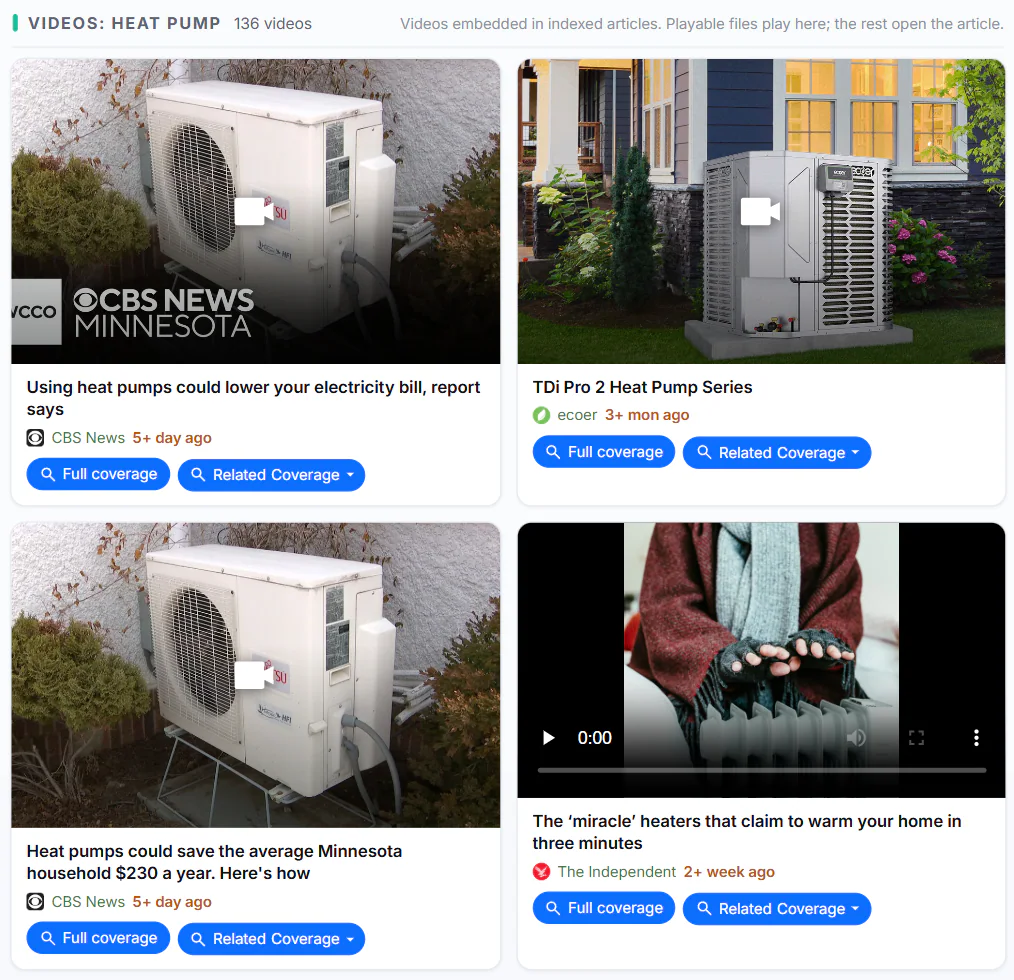
The Videos tab: a still with a play symbol opens the article; a card with play controls plays where it is.
- 1How many videos matched
- 2A still: opens the article
- 3The article's headline
- 4Plays on the card
#Filters and pages
Images and Videos have the same filter row as News: the date menu, Published or Discovered, the match menu, length and Sentiment. The filters apply to the articles the pictures and videos come from. See Narrow results with filters.
Each page shows 24 cards. Next and Previous sit below the grid.
Open Images or Videos without a search to see the latest pictures or videos added, newest first.
#Common questions
Why is there no Web column on Images and Videos?
These tabs show media from articles in the 4Search index only.
Why did a video open a news site instead of playing?
4Search plays a video on the card only when the article offers a file it can play. Otherwise it sends you to the article.
Where does the image count come from?
It is how many matches 4Search found for your search, up to a limit. You can page through only the first few pages of them.